
Introduction
Modern software delivery requires strong collaboration between developers, operations teams, security professionals, and engineering leaders. As applications become more complex with cloud infrastructure, containers, microservices, and distributed systems, disconnected workflows can slow down delivery and create operational challenges.
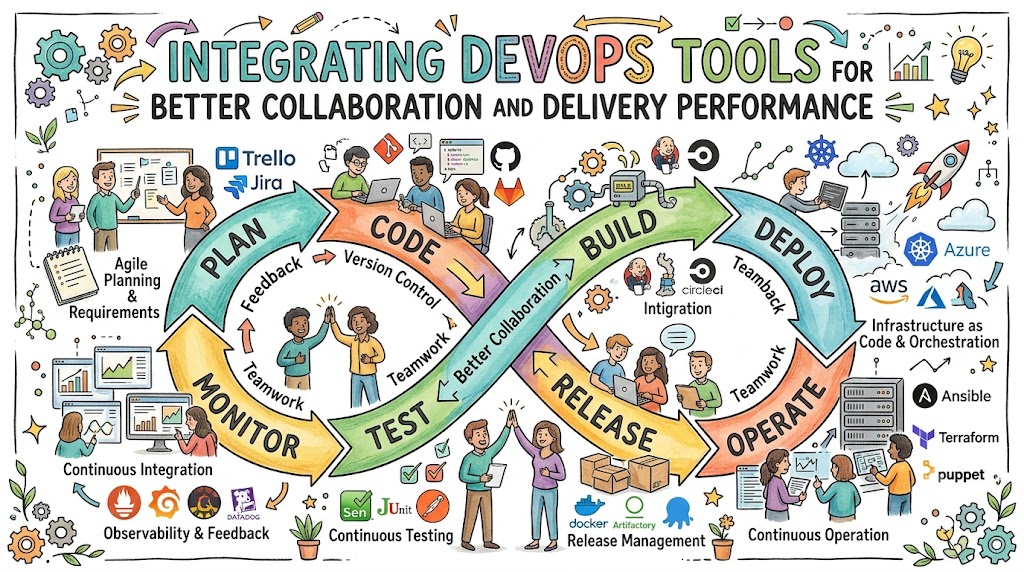
DevOps Tools Integration helps teams connect different technologies across the software delivery lifecycle. Instead of managing isolated tools, organizations can create a unified workflow where code changes, testing activities, deployments, infrastructure updates, security checks, and monitoring information flow together.
A well-integrated DevOps environment improves collaboration, reduces manual effort, increases visibility, and helps teams deliver software faster with greater reliability.
However, integration is not simply connecting more tools. Teams need a thoughtful approach that considers workflow requirements, technology compatibility, security, scalability, and engineering goals.
This guide explains how DevOps tool integration works, why it matters, which tools should be connected, common challenges, best practices, and how engineering teams can improve delivery performance.
What Is DevOps Tools Integration?
DevOps tools integration is the process of connecting different tools used across software development and operations workflows.
A connected DevOps ecosystem allows information to move automatically between:
- Source code platforms
- CI/CD pipelines
- Testing systems
- Cloud infrastructure
- Container platforms
- Security tools
- Monitoring systems
- Incident management platforms
The goal is creating a continuous workflow where teams have better visibility and fewer manual processes.
Why DevOps Tool Integration Matters
Without integration, engineering teams often face:
- Information silos
- Manual handoffs
- Slow troubleshooting
- Deployment delays
- Limited visibility
Integrated DevOps tools provide:
Better Collaboration
Developers, operations teams, and security teams work with shared information.
Faster Delivery
Automation reduces delays between development stages.
Improved Reliability
Connected monitoring and deployment workflows help teams detect issues faster.
Better Decision-Making
Engineering data provides insights into delivery performance.
DevOps Lifecycle and Tool Integration
A modern software delivery lifecycle includes multiple connected stages.
Planning
Teams manage:
- Requirements
- Tasks
- Issues
- Development priorities
Common tools:
- Jira
- GitHub Projects
- Azure Boards
Development
Developers manage:
- Source code
- Branches
- Code reviews
Common tools:
- GitHub
- GitLab
- Bitbucket
Continuous Integration
CI systems automatically:
- Build applications
- Run tests
- Validate changes
Common tools:
- Jenkins
- GitHub Actions
- GitLab CI/CD
Deployment
Deployment tools automate:
- Application releases
- Environment updates
- Rollbacks
Common tools:
- Argo CD
- Jenkins
- Spinnaker
Operations
Operations teams use:
- Monitoring
- Logging
- Incident response
Common tools:
- Prometheus
- Grafana
- Datadog
Important DevOps Tool Integration Areas
1. Source Control and CI/CD Integration
Source control systems should connect directly with CI/CD pipelines.
Example workflow:
- Developer commits code
- Repository detects changes
- CI pipeline starts automatically
- Tests execute
- Deployment workflow begins
Benefits:
- Faster feedback
- Reduced manual actions
- Consistent delivery process
2. CI/CD and Testing Integration
Testing should be part of automated delivery workflows.
Integration enables:
- Automated quality checks
- Security validation
- Faster defect detection
Examples:
- CI pipeline triggering automated tests
- Code quality checks before deployment
3. CI/CD and Cloud Integration
Cloud integration allows teams to automate application deployment.
Connected workflows can manage:
- Cloud resources
- Application releases
- Environment creation
Common technologies:
- Cloud platforms
- Infrastructure as Code tools
- Deployment automation systems
4. Infrastructure and Configuration Integration
Infrastructure tools help maintain consistent environments.
Integration between:
- Terraform
- Ansible
- Cloud platforms
allows teams to automate infrastructure management.
Benefits:
- Repeatable environments
- Faster provisioning
- Reduced configuration issues
5. Kubernetes and DevOps Tool Integration
Kubernetes environments often connect with:
- CI/CD systems
- Container registries
- Monitoring platforms
- Security tools
Example workflow:
- Code change is committed
- Container image is created
- Kubernetes deployment updates automatically
- Monitoring validates application health
6. Monitoring and Incident Management Integration
Monitoring systems should connect with operational workflows.
Integration helps teams:
- Detect problems
- Create alerts
- Start incident workflows
- Analyze failures
Benefits:
- Faster response
- Better reliability
- Improved troubleshooting
DevOps Tools Integration Architecture Example
| Workflow Stage | Tool Category | Example Tools | Integration Purpose |
|---|---|---|---|
| Planning | Project Management | Jira, Azure Boards | Track work |
| Development | Source Control | GitHub, GitLab | Manage code |
| Build | CI/CD | Jenkins, GitHub Actions | Automate builds |
| Testing | Quality Tools | SonarQube, Selenium | Validate software |
| Packaging | Containers | Docker | Create application images |
| Deployment | GitOps | Argo CD | Automate releases |
| Infrastructure | IaC | Terraform | Manage environments |
| Monitoring | Observability | Prometheus, Grafana | Track performance |
| Intelligence | Analytics | DevOpsIQ | Measure improvement |
Benefits of Integrated DevOps Workflows
Faster Software Delivery
Integration removes delays between development activities.
Teams can:
- Build faster
- Test automatically
- Deploy consistently
Improved Team Collaboration
Shared workflows reduce communication gaps.
Teams gain better understanding of:
- Code changes
- Deployment status
- System health
Better Software Quality
Automated testing and validation reduce production issues.
Faster Incident Resolution
Integrated monitoring provides faster visibility into problems.
Better Engineering Visibility
Connected tools provide data about:
- Delivery performance
- Reliability trends
- Operational issues
How to Integrate DevOps Tools Step by Step
Step 1: Map Existing Workflows
Understand:
- Current tools
- Manual processes
- Communication gaps
Do not integrate tools without understanding the workflow.
Step 2: Identify Integration Goals
Define objectives such as:
- Faster deployments
- Better monitoring
- Reduced manual work
- Improved collaboration
Step 3: Connect Core Development Tools
Start with:
- Source control
- CI/CD
- Testing
These create the foundation.
Step 4: Add Infrastructure Automation
Integrate:
- Infrastructure as Code
- Cloud platforms
- Configuration tools
Step 5: Connect Monitoring and Security
Add:
- Observability
- Security scanning
- Incident management
Step 6: Measure Results
Track:
- Deployment frequency
- Lead time
- Change failure rate
- Recovery time
These DORA metrics help evaluate delivery performance.
Real-World DevOps Integration Examples
Startup Engineering Teams
Startups often integrate:
- GitHub
- GitHub Actions
- Docker
- Cloud services
- Monitoring tools
Benefits:
- Faster releases
- Lower operational overhead
- Simple workflows
Enterprise Organizations
Large organizations integrate:
- Enterprise source control
- CI/CD platforms
- Kubernetes
- Security tools
- Observability platforms
Benefits:
- Standardized workflows
- Better governance
- Improved reliability
SRE Teams
SRE teams integrate:
- Monitoring systems
- Alerting platforms
- Incident management tools
- Engineering metrics
Benefits:
- Faster recovery
- Better reliability management
Common DevOps Integration Challenges
Tool Compatibility Problems
Challenge
Different tools may not communicate effectively.
Solution
Evaluate APIs, plugins, and integration capabilities before adoption.
Too Many Tools
Challenge
Excessive tools create complexity.
Solution
Build a focused tool ecosystem based on business requirements.
Security Risks
Challenge
Connected systems increase security considerations.
Solution
Implement:
- Access controls
- Secret management
- Security monitoring
Lack of Ownership
Challenge
Teams may not know who manages integrations.
Solution
Define clear responsibilities and documentation.
Best Practices for DevOps Tool Integration
Create Standard Workflows
Define consistent processes across teams.
Prioritize Automation
Automate repetitive activities first.
Maintain Security
Protect integrations with proper access management.
Monitor Integration Health
Ensure connected systems continue working correctly.
Document Processes
Maintain clear documentation for teams.
DevOps Skills Required for Tool Integration
Technical skills:
- Git workflows
- CI/CD pipelines
- APIs
- Cloud platforms
- Kubernetes
- Infrastructure as Code
- Monitoring
- Security practices
Professional skills:
- Collaboration
- Troubleshooting
- Communication
- Problem-solving
Practical DevOps Integration Projects
Project 1: Integrated CI/CD Pipeline
Objective:
Connect source code, testing, and deployment.
Tools:
- GitHub
- Jenkins
- Docker
Skills:
- Pipeline automation
- Software delivery workflows
Project 2: Cloud Infrastructure Workflow
Objective:
Automate cloud resource management.
Tools:
- Terraform
- Cloud platform
- CI/CD tool
Skills:
- Infrastructure automation
Project 3: Kubernetes Monitoring Integration
Objective:
Connect Kubernetes deployments with monitoring.
Tools:
- Kubernetes
- Prometheus
- Grafana
Skills:
- Cloud-native operations
- Observability
DORA Metrics and Delivery Performance
Integrated DevOps tools provide valuable engineering data.
Teams can measure:
Deployment Frequency
How often changes reach production.
Lead Time for Changes
How quickly code changes move through delivery.
Change Failure Rate
How often deployments cause problems.
Time to Restore Service
How quickly teams recover.
These metrics help organizations improve workflows and reliability.
They should support continuous improvement rather than individual evaluation.
How DevOpsIQ Supports Integrated Engineering Workflows
DevOpsIQ helps teams gain visibility across connected engineering systems.
It can help organizations:
- Connect engineering data sources
- Understand deployment activity
- Link incidents with changes
- Track reliability trends
- Monitor SLO performance
- Identify improvement opportunities
The Pulse Score provides a transparent service health view, while engineering timelines connect:
- Deployments
- Incidents
- Failures
- Rollbacks
- Recovery events
This helps engineering leaders understand delivery performance using measurable data and technical context.
BestDevOps Learning Support
BestDevOps helps professionals improve DevOps knowledge through:
- Tutorials
- Tool comparisons
- Learning roadmaps
- DevOps projects
- Certification guidance
- Interview preparation
It supports both beginners and experienced engineers building modern delivery skills.
Frequently Asked Questions
1. What is DevOps tools integration?
DevOps tools integration connects different development, deployment, infrastructure, security, and monitoring tools into a unified workflow.
2. Why is DevOps integration important?
Integration improves collaboration, automation, visibility, and software delivery performance.
3. Which tools should be integrated first?
Teams should start with source control, CI/CD, testing, and deployment workflows.
4. How does integration improve delivery speed?
It reduces manual handoffs and automates repetitive activities.
5. Can all DevOps tools integrate together?
Not always. Teams should evaluate compatibility, APIs, and ecosystem support.
6. How does integration improve reliability?
Connected monitoring and deployment workflows help teams detect and recover from issues faster.
7. What skills are needed for DevOps integration?
Skills include automation, cloud, CI/CD, APIs, containers, and troubleshooting.
8. How do DORA metrics help integrated workflows?
They measure delivery performance and help identify improvement areas.
9. Should companies use many DevOps tools?
No. Companies should choose tools that provide value and integrate effectively.
10. How does BestDevOps support DevOps learning?
BestDevOps provides tutorials, comparisons, projects, and learning resources.
Key Takeaways
- DevOps tool integration connects the complete software delivery lifecycle.
- Integrated workflows improve collaboration and automation.
- Source control, CI/CD, cloud, security, and monitoring should work together.
- Tool selection should focus on business and engineering needs.
- DORA metrics help measure delivery improvement.
- Engineering intelligence improves decision-making.
Conclusion
Integrating DevOps tools is essential for organizations that want faster software delivery, better collaboration, and improved reliability. Modern engineering teams depend on connected workflows where development, operations, security, and monitoring systems share information effectively. A successful DevOps environment is not created by using the largest number of tools. It is created by selecting the right technologies and connecting them into a simple, secure, and scalable workflow. Source control, CI/CD, cloud platforms, Kubernetes, security automation, and observability tools work together to create efficient delivery systems.

